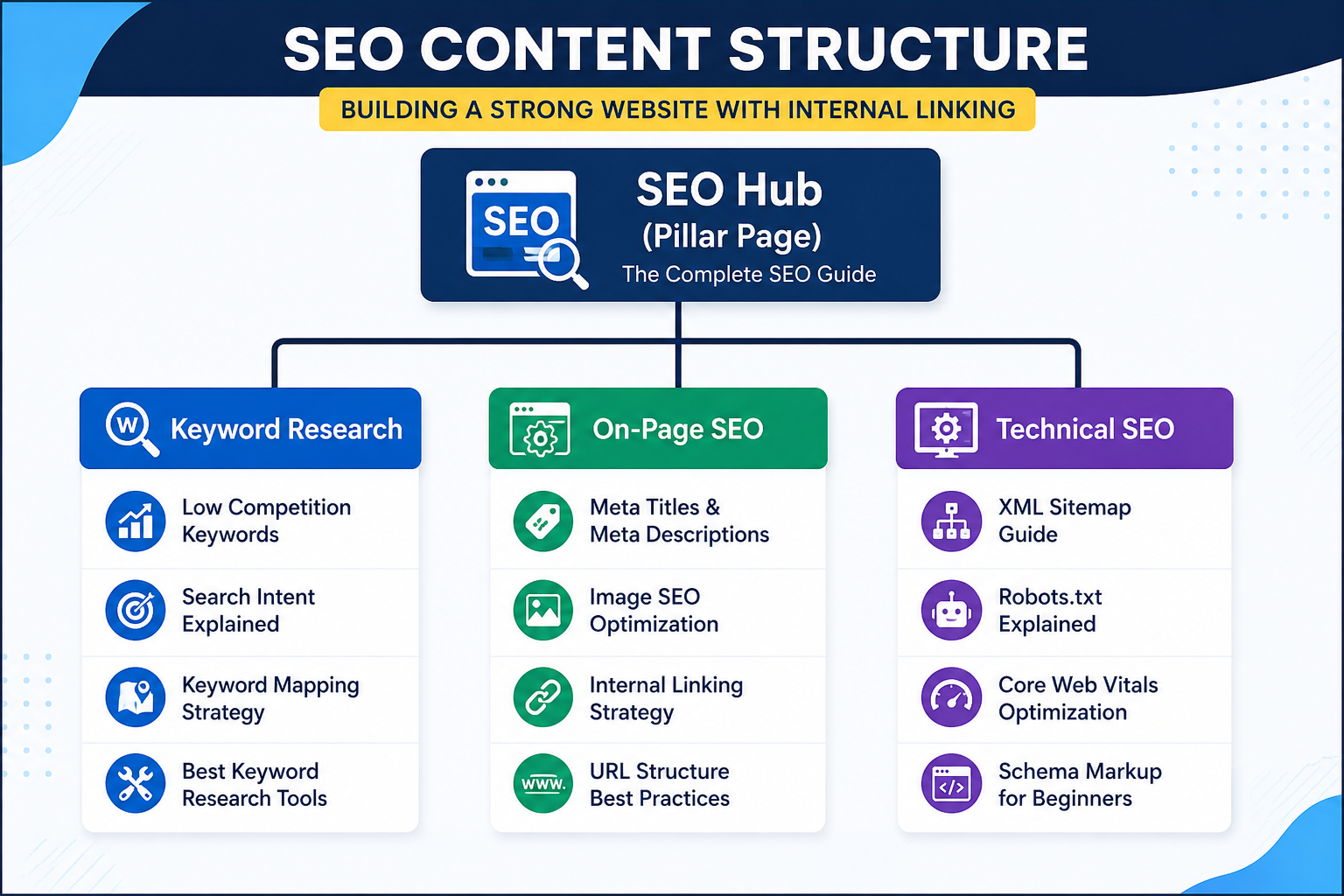
Creating high-quality content is only one part of successful SEO. If your articles are isolated and not connected to each other, search engines may struggle to understand the relationship between your pages.
This is where internal linking becomes essential.
An internal link is a hyperlink that connects one page of your website to another page on the same domain. These links help visitors navigate your website, guide search engines through your content, and distribute authority across your pages.
Many beginners focus heavily on publishing new articles but forget to connect them together. As a result, valuable content often receives fewer visits and search engines may not fully understand the structure of the website.
A well-planned internal linking strategy solves this problem. It creates a logical content network, improves user experience, and helps Google identify your most important pages.
In this complete guide, you'll learn how to build an effective internal linking strategy that supports long-term SEO growth and creates a stronger website structure.
Table of Contents
- What Is Internal Linking?
- Why Internal Links Matter
- Internal Links vs External Links
- Benefits of Internal Linking
- Types of Internal Links
- Best Anchor Text Practices
- How to Build Topic Clusters
- How Many Internal Links Should You Add?
- Common Internal Linking Mistakes
- SEO Checklist
- Frequently Asked Questions
- Final Thoughts
What Is Internal Linking?
Internal linking is the practice of connecting one page on your website to another related page using hyperlinks.
For example, if you publish an article about On-Page SEO, you can naturally link to another article about Keyword Research.
This creates a relationship between both pages.
Search engines use these connections to discover content, understand website structure, and determine which pages are most important.
For users, internal links provide a clear learning path and make it easier to explore related topics.
Internal Links vs External Links
Although both are important, they serve different purposes.
| Internal Links | External Links |
|---|---|
| Connect pages within your website | Point to another website |
| Improve website structure | Add references and credibility |
| Help Google crawl your site | Support information with trusted sources |
| Keep visitors on your website | Send visitors to external resources |
A strong SEO strategy uses both types appropriately.
Why Internal Linking Matters
Internal links provide benefits for both search engines and your visitors.
They help search engines:
- Discover new pages faster
- Understand the relationship between topics
- Crawl your website more efficiently
- Identify your most important content
They also help users:
- Find relevant information
- Continue reading related articles
- Spend more time on your website
- Navigate easily without searching again
For websites that regularly publish tutorials or blog posts, internal linking should be part of the publishing process—not an afterthought.
Benefits of Internal Linking
A smart internal linking strategy offers several SEO advantages.
Improves Website Structure
Instead of creating isolated pages, internal links organize your content into connected topics. This makes your website easier for both users and search engines to understand.
Increases Page Views
When readers find helpful links within an article, they're more likely to continue exploring your website.
This naturally increases page views and user engagement.
Helps Search Engines Crawl Your Website
Google discovers new pages by following links.
If an important page has no internal links pointing to it, it may take longer to be discovered and indexed.
Distributes Link Authority
Some pages naturally gain more authority through backlinks or organic traffic.
Internal links allow part of that authority to flow to related pages, strengthening your overall website.
Supports Topical Authority
When multiple articles on the same subject are connected, Google gains a clearer understanding of your expertise.
For example, if your website contains articles about:
- SEO-Friendly Blog Posts
- Keyword Research
- Low Competition Keywords
- On-Page SEO
- Meta Titles
- Internal Linking
and they all link to each other naturally, they form a strong SEO topic cluster.
Example: IncomeVA SEO Cluster
A simple internal linking structure could look like this:
SEO Friendly Blog Posts
│
▼
Keyword Research
│
▼
Low Competition Keywords
│
▼
On-Page SEO
│
▼
Meta Titles & Meta Descriptions
│
▼
Internal Linking Strategy
Each article should also link back to other relevant articles where appropriate. This creates a network rather than a one-way chain.
Types of Internal Links
Not every internal link serves the same purpose. Understanding the different types helps you build a logical website structure.
1. Contextual Links
Contextual links are placed naturally within the main content of an article.
Example:
If you're learning about internal linking, you should first understand keyword research because choosing the right keywords helps you create related content that can be linked together.
These links are the most valuable because they provide context for both users and search engines.
2. Navigation Links
Navigation links appear in your website's menu, header, or sidebar.
Examples include:
- Home
- Blog
- Web Design Tutorials
- SEO Tutorials
- IELTS Practice
- Contact
These links help visitors navigate your website efficiently.
3. Footer Links
Footer links appear at the bottom of every page.
Common examples include:
- About Us
- Privacy Policy
- Terms & Conditions
- Contact
- Sitemap
Although useful, footer links generally carry less contextual value than links placed within your content.
4. Related Posts
Showing related articles at the end of each post encourages visitors to continue reading.
For example:
Related Articles
- How to Write SEO Friendly Blog Posts
- On-Page SEO Checklist
- Meta Titles and Meta Descriptions
- Keyword Research Guide
This improves user engagement and increases page views.
What Is Anchor Text?
Anchor text is the visible, clickable text used in a hyperlink.
Search engines use anchor text to understand the topic of the linked page.
Poor Anchor Text : Click Here/ Read More/ This Article
These don't tell users or Google what the linked page is about.
Better Anchor Text
- How to Find Low Competition Keywords
- Complete On-Page SEO Checklist
- Keyword Research Guide for Beginners
Best Anchor Text Practices
When creating internal links, follow these best practices.
Be Descriptive
Your anchor text should accurately describe the linked page.
Example:
Instead of : Learn More Use Learn how to optimize your blog posts with our On-Page SEO Checklist.
Keep It Natural
Don't force keywords into every sentence.
Write for readers first.
Google prefers natural language over repetitive optimization.
Avoid Over-Optimization
Many beginners repeatedly use the exact same anchor text.
Example: Keyword Research/ Keyword Research/ Keyword Research/ Keyword Research
Instead, vary your anchor text naturally.
Examples:
- Learn keyword research
- Beginner's keyword guide
- SEO keyword research tutorial
- Finding profitable keywords
- Keyword research for new websites
This creates a more natural linking profile.
Pillar Pages vs Cluster Pages
One of the most effective SEO strategies is building Topic Clusters.
A topic cluster consists of one comprehensive Pillar Page supported by multiple related Cluster Pages.
Pillar Page
A pillar page covers a broad topic in depth.
Example:Complete SEO Guide for Beginners
Cluster Pages
Cluster pages cover individual subtopics.
Examples:
- Keyword Research
- On-Page SEO
- Internal Linking
- Technical SEO
- Image SEO
- Meta Titles
- XML Sitemap
Each cluster page links back to the pillar page, and the pillar page links to every cluster page.
This creates a strong content network.
Example Topic Cluster

This structure helps Google understand that your website covers SEO comprehensively.
How Many Internal Links Should You Add?
There is no fixed number.
Instead of focusing on quantity, focus on relevance.
As a general guideline:
Short Article (800–1,200 words)
Add 3–5 relevant internal links.
Medium Article (1,500–2,500 words)
Add 5–8 internal links.
Comprehensive Guide (3,000+ words)
Add 8–15 internal links where they naturally fit.
Never add links simply to increase the count. Every link should provide additional value to the reader.
Where Should You Place Internal Links?
The placement of internal links also matters.
Good locations include:
- Introduction (link to foundational guides)
- Within the body where related topics are mentioned
- Before the conclusion
- "Related Articles" section at the end
Avoid placing all links together in one paragraph. Distribute them naturally throughout the article.
Example for IncomeVA
Suppose you're publishing a new article titled:
Image SEO: How to Optimize Images for Google
Within that article, you could naturally link to:
- How to Write SEO Friendly Blog Posts Step by Step
- How to Do Keyword Research for a New Website
- How to Find Low Competition Keywords That Rank
- On-Page SEO Checklist for Beginners
- How to Write Meta Titles and Meta Descriptions That Get Clicks
- Internal Linking Strategy for SEO
This creates a tightly connected SEO content hub.
Common Internal Linking Mistakes
Even experienced website owners sometimes make internal linking mistakes that reduce SEO performance. Avoiding these issues will help you build a stronger website structure.
1. Orphan Pages
An orphan page is a page that has no internal links pointing to it.
If Google cannot easily discover a page through your website's navigation or content, it may take longer to crawl and index.
Example
You publish a new article but never link to it from:
- Related blog posts
- Category pages
- Homepage
- Tutorial pages
As a result, the page receives very little internal authority.
Solution
Every new article should receive at least 3–5 relevant internal links from existing content.
2. Using Generic Anchor Text
Avoid using anchor text like:
❌
Click HereRead MoreVisit This PageInstead use descriptive anchor text.
Learn How to Find Low Competition KeywordsComplete On-Page SEO ChecklistGoogle understands descriptive links much better.
3. Linking to Irrelevant Pages
Every internal link should help the reader.
For example:
An article about Image SEO should naturally link to:
- On-Page SEO
- Meta Titles
- Technical SEO
It shouldn't randomly link to an unrelated IELTS page.
Relevant links improve user experience and topical relevance.
4. Too Many Internal Links
Adding excessive links can overwhelm readers.
Instead of placing dozens of links in every paragraph, include only those that genuinely help the reader continue learning.
Quality always matters more than quantity.
5. Forgetting Old Articles
Many bloggers publish new content but never update older posts.
This is a missed SEO opportunity.
Whenever you publish a new article:
- Open older related articles.
- Add a link to the new article.
- Update outdated information if necessary.
This keeps your content fresh and strengthens your internal link network.
Internal Linking Checklist
Before publishing any article, review this checklist.
✅ Link to at least 3–5 relevant articles
✅ Use descriptive anchor text
✅ Avoid broken internal links
✅ Link naturally within the content
✅ Add a "Related Articles" section
✅ Update older articles with links to the new post
✅ Connect articles within the same topic cluster
✅ Check every internal link after publishing
Following this process consistently helps create a website that is easier for users to navigate and for search engines to crawl.
Frequently Asked Questions
How many internal links should a blog post have?
There is no fixed number.
As a general guideline:
- 800–1,200 words: 3–5 internal links
- 1,500–2,500 words: 5–8 internal links
- 3,000+ words: 8–15 relevant internal links
The focus should always be on relevance rather than quantity.
Do internal links improve SEO?
Yes.
Internal links help search engines discover pages, understand your website structure, and identify relationships between related topics. They also improve navigation for visitors.
Can I use the same anchor text multiple times?
Occasionally, yes. However, using the exact same anchor text everywhere can look repetitive.
Use natural variations whenever appropriate.
Should I add internal links to old posts?
Absolutely.
Updating older articles with links to new content is one of the easiest ways to strengthen your website's internal linking strategy.
Are navigation menu links enough?
No.
Navigation links are useful, but contextual links placed naturally within your content provide much stronger SEO value because they add topical context.
Final Thoughts
Internal linking is one of the simplest yet most effective SEO techniques you can implement. Unlike backlinks, which often depend on other websites, internal links are completely under your control.
By connecting related articles, using descriptive anchor text, and organizing content into topic clusters, you create a website that is easier to navigate, easier to crawl, and more valuable for readers.
Remember that internal linking is not a one-time task. Each time you publish a new article, revisit your existing content and add relevant links where they make sense. Over time, this habit builds a strong content network that supports long-term organic growth.
Consistency is the key. A well-planned internal linking strategy can improve user engagement, strengthen topical authority, and help your most important pages perform better in search results.
Related Articles
Continue learning SEO with these guides: